Diff
1diff --git a/plugins/colemak/README.md b/plugins/colemak/README.md
2new file mode 100644
3index 0000000000000000000000000000000000000000..4da4bc126cd3a7baf4c7199e14528209884c74d4
4--- /dev/null
5+++ b/plugins/colemak/README.md
6@@ -0,0 +1,48 @@
7+# Colemak plugin
8+
9+This plugin remaps keys in `zsh`'s [`vi`-style navigation mode](http://zsh.sourceforge.net/Doc/Release/Zsh-Line-Editor.html#Keymaps)
10+for a [Colemak](https://colemak.com/) keyboard layout, to match the QWERTY position:
11+
12+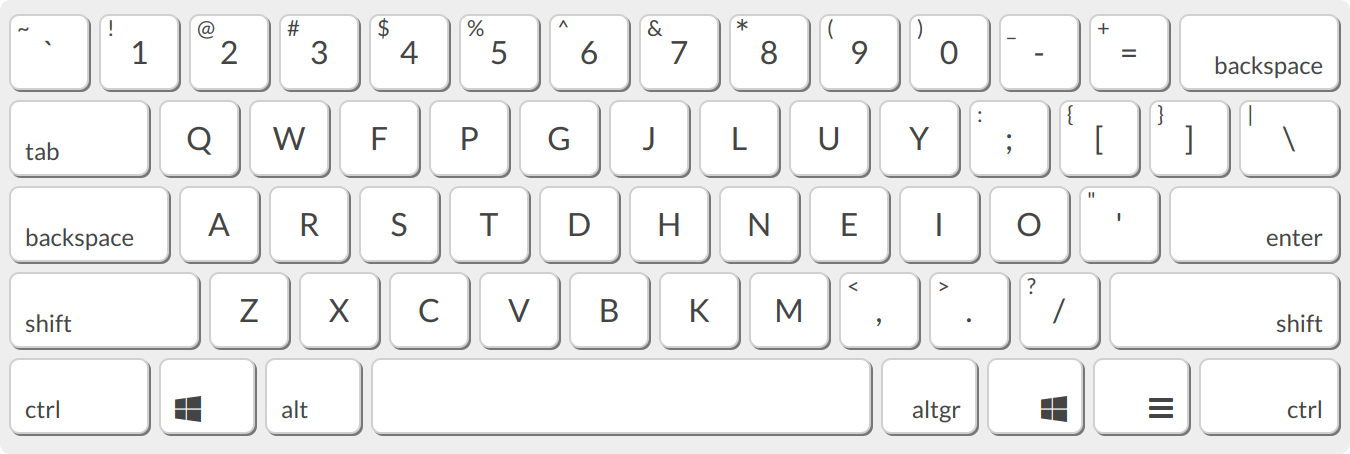
13+
14+To use it, add it to the plugins array in your `~/.zshrc` file:
15+
16+```
17+plugins=(... colemak)
18+```
19+
20+You will also need to enable `vi` mode, so add another line to `~/.zshrc`:
21+```
22+bindkey -v
23+```
24+
25+Restart your shell and hit the `<ESC>` key to activate `vicmd` (navigation) mode,
26+and start navigating `zsh` with your new keybindings!
27+
28+## Key bindings for vicmd
29+
30+| Old | New | Binding | Description |
31+|------------|------------|---------------------------|----------------------------------------------------|
32+| `CTRL`+`j` | `CTRL`+`n` | accept-line | Insert new line |
33+| `j` | `n` | down-line-or-history | Move one line down or command history forwards |
34+| `k` | `e` | up-line-or-history | Move one line up or command history backwards |
35+| `l` | `i` | vi-forward-char | Move one character to the right |
36+| `n` | `k` | vi-repeat-search | Repeat command search forwards |
37+| `N` | `K` | vi-rev-repeat-search | Repeat command search backwards |
38+| `i` | `u` | vi-insert | Enter insert mode |
39+| `I` | `U` | vi-insert-bol | Move to first non-blank char and enter insert mode |
40+| `<none>` | `l` | vi-undo-change | Undo change |
41+| `J` | `N` | vi-join | Join the current line with the next one |
42+| `e` | `j` | vi-forward-word-end | Move to the end of the next word |
43+| `E` | `J` | vi-forward-blank-word-end | Move to end of the current or next word |
44+
45+## Key bindings for less
46+
47+| Keyboard shortcut | `less` key binding |
48+|-------------------|--------------------|
49+| `n` | forw-line |
50+| `e` | back-line |
51+| `k` | repeat-search |
52+| `ESC`+`k` | repeat-search-all |
53+| `K` | reverse-search |
54+| `ESC`+`K` | reverse-search-all |
55diff --git a/plugins/tugboat/README.md b/plugins/tugboat/README.md
56new file mode 100644
57index 0000000000000000000000000000000000000000..14f828f854d140b35bbe2a3391ba3e07cc4764f2
58--- /dev/null
59+++ b/plugins/tugboat/README.md
60@@ -0,0 +1,12 @@
61+# Tugboat plugin
62+
63+This plugin adds autocompletion for Tugboat, a command line tool for interacting with your
64+[DigitalOcean droplets](https://www.digitalocean.com/products/droplets/).
65+
66+To use it, add it to the plugins array in your `~/.zshrc` file:
67+
68+```zsh
69+plugins=(... tugboat)
70+```
71+
72+Further documentation for Tugboat can be found in the [Tugboat repository](https://github.com/petems/tugboat).