README.md
Colemak plugin
This plugin remaps keys in zsh's vi-style navigation mode
for a Colemak keyboard layout, to match the QWERTY position:
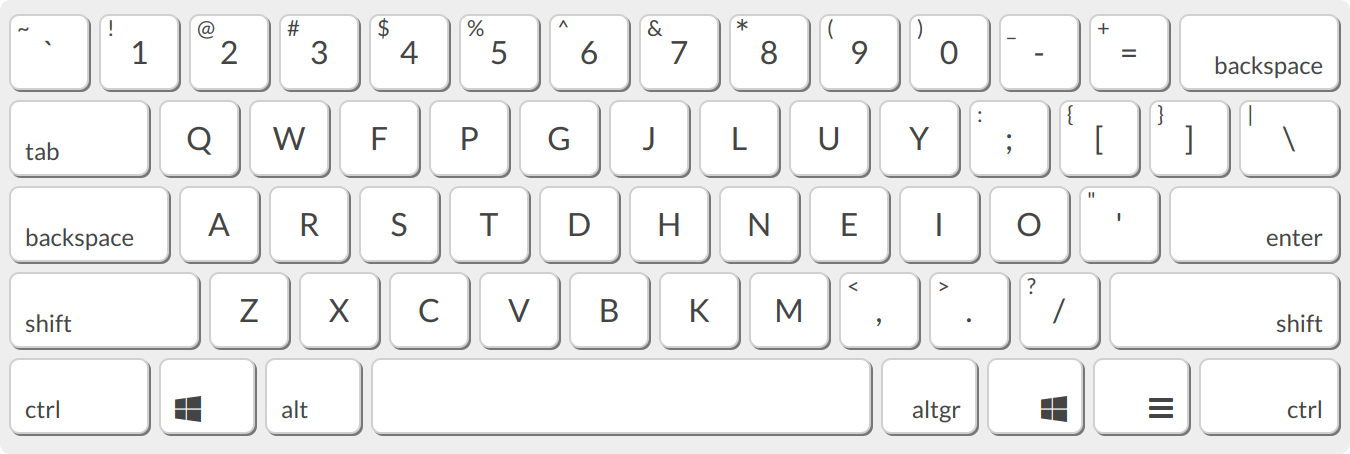
To use it, add it to the plugins array in your ~/.zshrc file:
plugins=(... colemak)
You will also need to enable vi mode, so add another line to ~/.zshrc:
bindkey -v
Restart your shell and hit the <ESC> key to activate vicmd (navigation) mode,
and start navigating zsh with your new keybindings!
Key bindings for vicmd
| Old | New | Binding | Description |
|------------|------------|---------------------------|----------------------------------------------------|
| CTRL+j | CTRL+n | accept-line | Insert new line |
| j | n | down-line-or-history | Move one line down or command history forwards |
| k | e | up-line-or-history | Move one line up or command history backwards |
| l | i | vi-forward-char | Move one character to the right |
| n | k | vi-repeat-search | Repeat command search forwards |
| N | K | vi-rev-repeat-search | Repeat command search backwards |
| i | u | vi-insert | Enter insert mode |
| I | U | vi-insert-bol | Move to first non-blank char and enter insert mode |
| <none> | l | vi-undo-change | Undo change |
| J | N | vi-join | Join the current line with the next one |
| e | j | vi-forward-word-end | Move to the end of the next word |
| E | J | vi-forward-blank-word-end | Move to end of the current or next word |
Key bindings for less
| Keyboard shortcut | less key binding |
|-------------------|--------------------|
| n | forw-line |
| e | back-line |
| k | repeat-search |
| ESC+k | repeat-search-all |
| K | reverse-search |
| ESC+K | reverse-search-all |